Name blacklist in the mass emailing program |
  
|
Name blacklist in the mass emailing program |
|
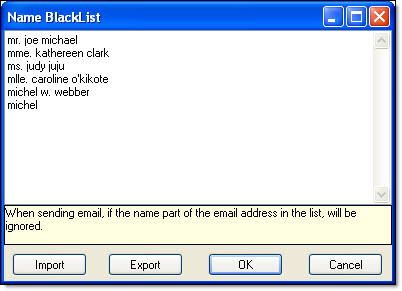
In the mass emailing program, to add a name to your name blacklist, you need to click on “View”, then on “Name Black list”. The “Name blacklist” dialog box will be displayed. Enter the name and click on the “Ok” button to save the data. When you send messages, the emails containing the names in this list will be ignored.
You can import a name blacklist in Mass Mailing News:
Step 1: Click on the “Import” button.
Step 2: Choose your text document and click on the “Open” button.
Step3: The domain names on your list are displayed in the “Domain blacklist” dialog box.
Step 4: Click on the “Ok” button to close the dialog box and to save the data.
You can also export a name blacklist:
Step1: Click on the “Export” button. The “Save as” dialog box will be displayed.
Step 2: Give your list a name, choose your location (ex.: desktop, my documents, etc.) and click on the “Save” button.
Step 3: Click on the “Ok” button to close the dialog box and to save the data.
Note: The list is saved in the configuration software folder regardless of your mailing lists.