Send directly in Mass Mailing News |
  
|
Send directly in Mass Mailing News |
|
When the system uses the direct sending mode, the DNS server addresses registered in this list will be used. To find out the DNS server addresses, contact your Internet provider or you technical support department. Insert the fastest first. Click on the “Ok” button to close the dialog box and to save your data.
1.To start, go to the “Send” menu then click “Sending Method”.
2.Select “Send directly” and then click on the “DNS Servers…” button.
3.Enter your DNS servers in the box.
4.Click “Ok” button to close the dialog box and to save the data.
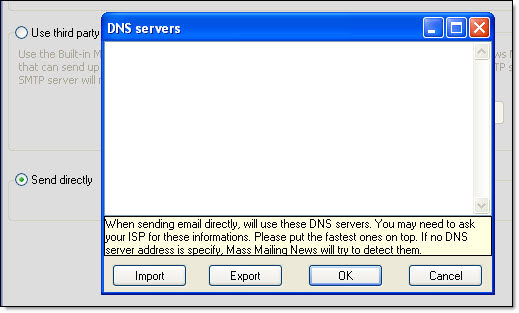
5.Click “Ok” button to close the dialog box and to save the data.
Note: Keep in mind that certain e-mail domains (for instance, Hotmail) won’t allow direct sends: the message gets rejected if it was originated from a desktop system as opposed to a public SMTP server.
You can import a list of server addresses:
Step 1: Click on the “Import” button.
Step 2: Choose your text document containing the list of servers and click on the “Open” button.
Step 3: The DNS server addresses imported are displayed in the “DNS Server” dialog box.
Step 4: Click on the “Ok” button to close the dialog box and to save the data.
You can also export a list of server addresses:
Step 1: Click on the “Export” button. The “Save as” dialog box will be displayed.
Step 2: Give your list a name, choose a location (ex.: desktop, my documents, etc.) and click on the “Save” button.
Step 3: Click on the “Ok” button to close the dialog box and to save the data.
Your message is not delivered: 1) Double check the settings & the email addresses. 2) Verify that you don't have a firewall that blocks outgoing messages. 3) Be patient. Usually the message delivery is instant, but we've seen where the ISP has delayed the delivery of a message for hours. 4) Also check to make sure your computer has not been flagged as a SPAMMER. Check if your mail server has been blacklisted. How? Make some searches online to find companies that offer this service (search with keyword like this “mail server has been blacklisted”. |
*The list of the most important SMTP error codes...