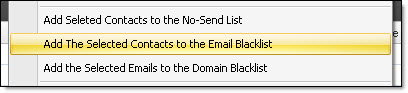
Add the selected contacts to the blacklist |
  
|
Add the selected contacts to the blacklist |
|
Add the selected contacts to the blacklist in Mass Mailing News. First, click on the “Contact list” tab and, from the “Tools” menu, select “Add the selected contacts to the black list” and confirm your choice. If you click on the “Yes” button the program will delete the email addresses in the list and will add them to the blacklist. And if you click on the “No” button, the program will keep the email addresses in your contact list and will add them to the blacklist. When sending messages, they will not be sent to the contacts which are on the blacklist or the no-send list.