Tools and tips in Mass Mailing News |
  
|
Tools and tips in Mass Mailing News |
|
Our free bulk e-mail software contains multiple windows and lots of features. With Management-Ware Mass Mailing News you can create, launch and track email campaigns.
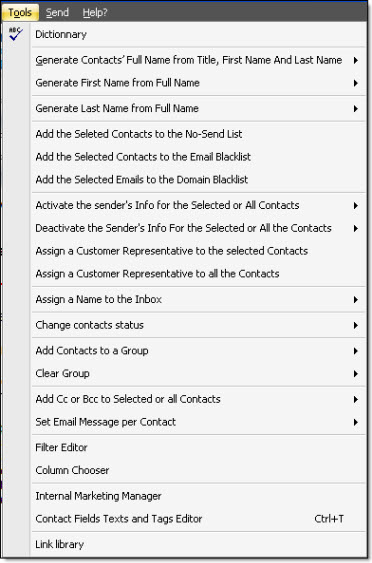
When you click on “Tools” you should see the following items:
|
- Dictionary - Generate contacts’ full name from the title, first name and last name • for the selected contacts only • for all contacts - Generate first name from full name • for the selected contacts only • for all contacts - Generate last name from the full name • for the selected contacts only • for all contacts - Add selected contacts to the no-send list - Add the selected contacts to the email blacklist - Add the selected emails to the domain blacklist - Activate the sender’s info for the selected or all the contacts • for the selected contacts only • for all contacts - Deactivate the sender’s for the selected or all the contacts • for selected contacts only • for all contacts - Assign a customer representative to the selected contacts - Assign a customer representative to all the contacts - Assign a name to the inbox • Change the information to use for the inbox for the selected contacts • Change the information to use for the inbox for all the contacts - Change contacts status - Add Cc or Bcc to selected or all contacts - Add contacts to a group • Add the selected contacts to a group • Add all contacts to a group • Add / Edit a group - Clear group • Clear group from selected contacts • Clear group from all contacts - Set email message per contact • For all selected contacts • For all contacts - Filter editor - Column chooser - Internal Marketing Manager - Contact fields texts and tags editor - List library |