Read receipt in Mass Mailing News |
  
|
Read receipt in Mass Mailing News |
|
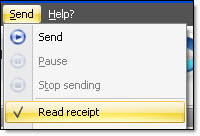
From the taskbar, go to the “Send” menu and select “Read receipt”. When you request an read receipt, the item “Read receipt” in the “Send” menu will be checked.
Note: Not all programs allow sending an read receipt. The users that have access to this feature in their emailing software will be able to respond you.