Export contacts from Mass Mailing News |
  
|
Export contacts from Mass Mailing News |
|
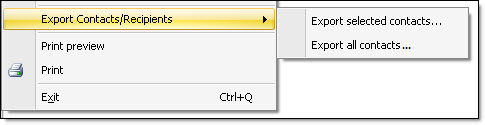
It's really easy to export your contacts from our bulk email software - Mass Mailing News! To be able to export your contacts, you have to click on the “Contacts list” tab first. If you are in the “Message editor” tab, you will realize that the export options are not activated in the “File” menu. To activate them, you must be in the “Contacts list” tab. Then, from the “File” menu, select “Export contacts/recipients” and select “Export selected contacts” or “Export all contacts”.
Note: Mass Mailing News allows you to export contacts. In order to do so, you have to have the professional’s edition.