Import contacts from a database, Excel and XML file |
  
|
Import contacts from a database, Excel and XML file |
|
Mass Mailing News allows you to import contacts from a database, Excel and XML file.
Our mass email software contains multiple windows and lots of features. With Management-Ware Mass Mailing News you can create, launch and track email campaigns.
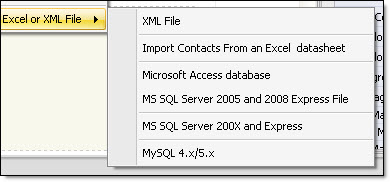
From the “File” menu, you can import your contacts. By selecting “Import contacts/recipients” you will see a sub category that will be displayed. When you click on “Import contacts from a database or Excel and XML file” you should see the following items;
- XML file
- Import contacts from an Excel datasheet
- Microsoft Access database
- MS SQL Server 2005 and 2008 Express file
- MS SQL Server 200x and Express
- My SQL 4.x / 5.x