SMTP- Secure Configuration |
  
|
SMTP- Secure Configuration |
|
To set up your bulk email senders program, use the information below. We recommend you to use your Internet Service Provider's (ISP) SMTP server. You may however use any SMTP server you have access to. (Most people find it useful to use the same settings in their Email client if possible). If possible, copy your settings from your existing E-mail client program (such as Outlook).
In the image below we used a Gmail account to set up the program. Yes, it is possible to do mass mailing with a Gmail account. In several countries, Gmail sending limit is 100 messages per day.
Example configuration for Gmail email address account:
1.To start, go to the “Send” menu then click “Sending Method”. The e-mail program offers this option (Sending via SMPT servers) by default.
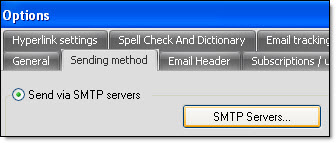
2.Click on the “SMTP Servers…” button. The “SMTP Servers” dialog box will be displayed.
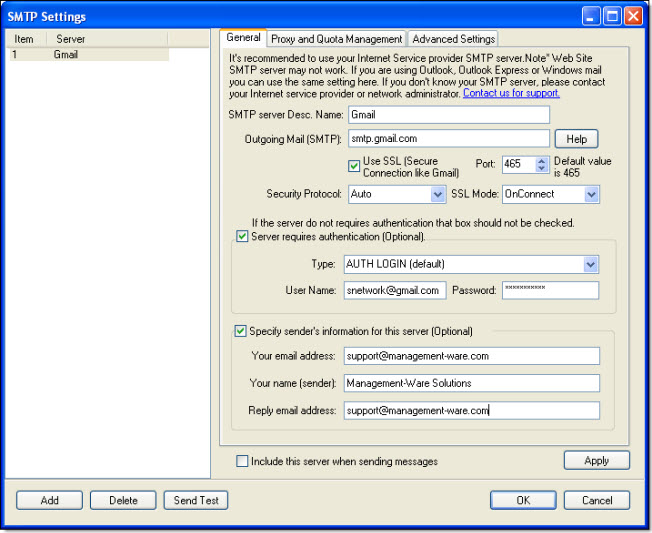
3.Click on the “Add” button.
4.In the field “SMTP Server Desc. Name”, enter a name (e.g.: Bell Verizon).
5.For Gmail the port is Port: 465. For another providers, enter the right value.
6.Check the box “Use SSL (Secured connection like Gmail)”. If applicable, choose your security protocol.
7.In the field “Outgoing Mail server Address (SMTP)”, enter the SMTP server address (E.g.: smtp.gmail.com).
Note: If you don't know the address of your server, contact your Internet service provider or your technical support department. Management-Ware Solutions offers a list of providers and server addresses. To consult the list, see below “Network provider - SMTP server list”.
8.Check the box “Use SSL (Secured connection like Gmail)”. If applicable, choose your security protocol.
9.If applicable, choose the type of connection, otherwise, use the default mode.
10.Check “Specify sender’s information for this server (optional)” box. Enter the sender's information.
11.Enter your username (e.g.: massmailing@gmail.com and password.
12.Enter any email address in the fields “Your email address ” and “Reply email address ” . Enter any name in the field “ Your name (sender)” – this is optional.
Important Note: In order to send messages, some Internet Service Providers or Web host require that clients enter the same email address in both the “User Name” and the “Your email address (Sender)” fields. If the data does not match, in some cases, you will not be able to send messages. Please do your test!
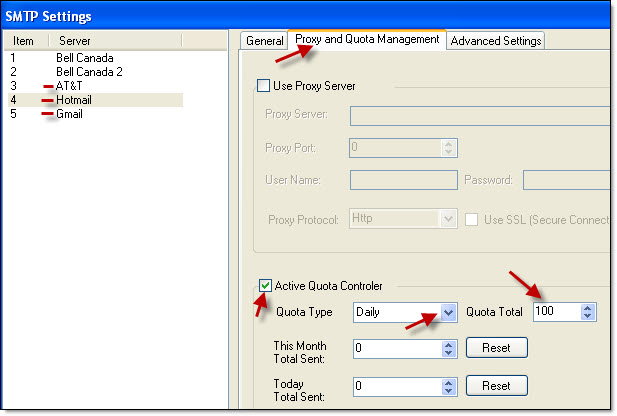
13.If your Internet provider limits your outgoing messages, you can then activate the quota controller. You must respect the limitations of your SMTP server address. For example - if your daily quota is 100 emails then, enter this value in the 'Proxy and Quota Management' table. To know your limit/ quota, please contact your ISP or your hosting company.
1.Click ''Proxy and Quota Management'' table
2.Enable the controller by clicking the check box 'Active Quota Controller'
3.Select the quota type: daily or monthly
4.Enter the quota: 100
5.Return to the General tab to continue
14.Click on the “Ok” button to close the dialog box and to save the data.
To remove a server address, you just need to select the address on your list and click on the “Delete” button.
To cancel, just click on the “Cancel” button. If you click on “Cancel”, your data will not be saved.
Note: You can configure multiple SMTP server addresses and use them simultaneous.
Your message is not delivered: 1.Double check the settings & the email addresses. 2.Verify that you don't have a firewall that blocks outgoing messages. 3.Be patient. Usually the message delivery is instant, but we've seen where the ISP has delayed the delivery of a message for hours. 4.Also check to make sure your computer has not been flagged as a SPAMMER. Check if your mail server has been blacklisted. How? Make some searches online to find companies that offer this service (search with keyword like this “mail server has been blacklisted”. |
*The list of the most important SMTP error codes...
Example configuration for Hotmail email address account:
