Add Cc or Bcc to selected or all contacts |
  
|
Add Cc or Bcc to selected or all contacts |
|
On the “Tools” menu, go to "Add CC or BCC to selected or all contacts” and make a choice between “Add and enable Cc and Bcc for selected contacts” and "“Add and enable Cc and Bcc for all contacts”." Then, the “Add CC and BCC to one or more contacts” dialog box will appear.
Read the instructions that appear on the dialog box.

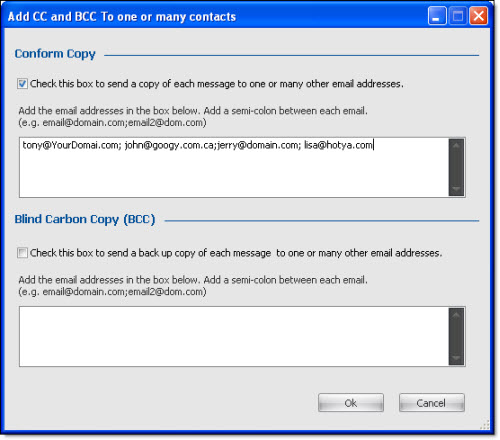
To add or edit email addresses in the section conform copy (carbon copy), you must check the “Check this box to send a copy of each message to one or many other email addresses.” box. Then, enter your email addresses in the text box. After you have entered the data, click on the “Ok” button to save and close the dialog box.
Blind Carbon Copy – It is used to send the email to several people at the same time and all the recipients can see who the other recipients of this email are. (Everyone can see the other recipient’s emails).
Blind Carbon Copy - It is used to send the email to several people at the same time but none of the recipients can see who the other recipients of this email are.