Edit the selected contact in the mass mailer program |
  
|
Edit the selected contact in the mass mailer program |
|
1.To manually edit a contact from the contact list, you can double click directly on the contact to display it or click on the “Contacts” menu and select “Edit selected contact”.
2.Then, the “Contact form” dialog box will be displayed automatically.
3.If needed, modify the contact form and click on the “Ok” button to close the dialog box and save the data. If you click on “Cancel”, your data will not be saved.
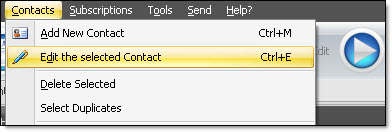
Note: If you are in the “Message editor” tab, you will realize that many items are not activated in the “Contacts” menu. In order to activate these items, you need to be in the “Contacts list” tab of the mass mailer program.