Manage your contact list in Mass Mailing News |
  
|
Manage your contact list in Mass Mailing News |
|
Our email blast software contains multiple windows and lots of features. With Management-Ware Mass Mailing News you can create, launch and track email campaigns.
|
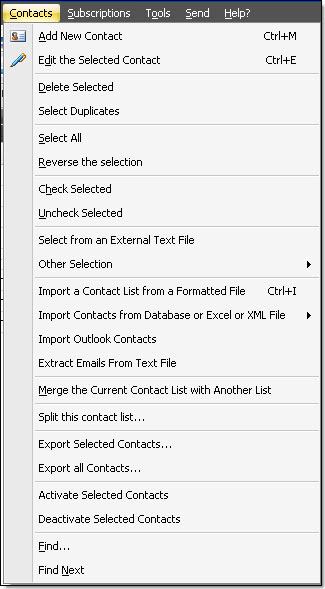
From the “Contacts” menu, you can:
- Add new contact - Edit the selected contact - Delete selected contact - Select duplicates - Select all - Reverse the selection - Check selected - Uncheck selected - Other selection Select sent emails • Select sent emails • Select unsent emails • Select emails failed • Select bad email • Select all black listed emails • Select all black listed domain • Select all black listed full name, first or last name - Import a contact list from a formatted file - Import contacts from a database or Excel or XML file • XML file • Import contacts from an Excel data sheet • Microsoft Access Database • MS SQL servers 2005 and 2008 express file • MS SQL server 200X and Express • MySQL 4.x/5.x - Import Outlook contacts - Extract emails from text file - Merge the current contact list with another list - Split this contact list... - Export selected contacts - Export all contacts - Activate selected contacts - Deactivate selected contacts - Find - Find next |
|
|
Note: To have access to all the options of the “Contacts” menu, first you have to click on the “Contact list” tab. Then, all the choices will be activated.