Languages - mass mailing software |
  
|
Languages - mass mailing software |
|
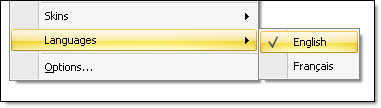
Management-Ware Mass Mailing News offers three (3) languages, English, Spanish and French (other languages will be added). To change the language, click on “View”, and then on “Languages” and select the preferred language. The “Change the software display language” dialog box will be displayed. Click on the “Ok” button to close the dialog box and to save the data.
Note: You need to close and to restart the program in order to use it in the language of your choice.