Print preview an HTML email message |
  
|
Print preview an HTML email message |
|
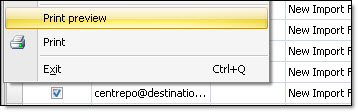
If you want to print preview an HTML email message, you can view it before printing it. From the “File” menu select “Print preview”. The “Print preview” dialog box will be displayed.
If you are satisfied with the result, you can click on the “Print” button, located on the top of the screen on the left. To close this dialog box, click on the “Close” button or click on the red “X”, on the top of the screen on the right.