Conditional merge script |
  
|
Conditional merge script |
|
To add a conditional script in your message, you just need to click on “Insertion”, and then select “Conditional script for merging”. The “Conditional script for merging designer” dialog box will be displayed automatically. Enter your conditions and click on “Insert”. Avoid entering conditions within the conditions.
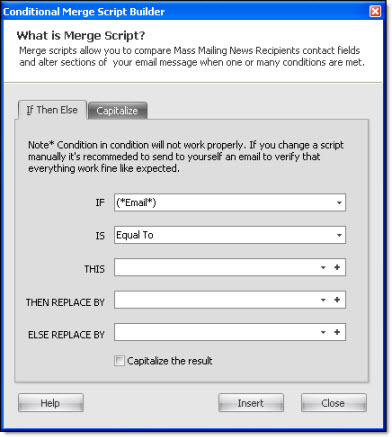
The “This”, “Then replace by” and “Else replace by” fields can be edited by clicking on the “+” button, located on the right hand side of the fields.
If you want the results to be displayed in upper case, check the “Capitalize the result” box.
To cancel or to close the dialog box, just click on the “Cancel” button. If you click on “Close”, you data will not be saved. To save before quitting, click on the “Insert” button.