Save the mailing list in Mass Mailing News |
  
|
Save the mailing list in Mass Mailing News |
|
From the “File” menu, select “Save the mailing list”. The “Save the mailing list” dialog box will be displayed. Give a name to your mailing list (Ex: April Electronic e-Marketing Campaign or massive email) and click on the “Save” button. Mailing lists allow you to send the same email to numerous people at the same time.
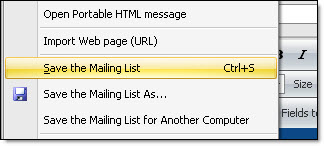
Note: Before you can send a message, all the lists must be previously saved. If the contact list is not saved, you will not be able to send your messages/newsletters .