Assign a name to the inbox |
  
|
Assign a name to the inbox |
|
Yes it's possible to assign a name/information to the inbox. See the instructions below.
Assign a name to the inbox >> change the information to use for the inbox for the selected contacts
From the “Tools” menu, select “Assign a name to the inbox” and select "Change the information to use for the inbox for the selected contacts”. A new dialog box will be displayed automatically. Select the field that you want to be displayed when receiving a message and click on the “Ok” button.
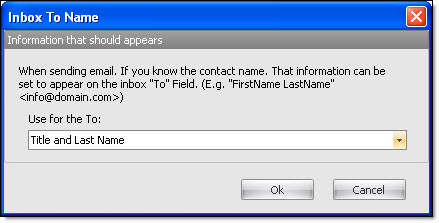
For example, if you select “Title and Last name” and if in your contact list you have that information, when the contact receives the email in the inbox, in the field “To”, you will be able to read, for example: “Mr. Thomas”.
Assign a name to the inbox >> change the information to use for the inbox for all the contacts
From the “Tools” menu, select “Assign a name to the inbox” and select "Change the information to use for the inbox for all the contacts”. A new dialog box will be displayed automatically. Select the field that you want to be displayed when receiving a message and click on the “Ok” button.
For example, if you select “Title and Last name”, and if in your contact list you have this information, when the contact receives an email in the inbox, in the field “To”, you will be able to read, for example: “Mr. Thomas”.
Note: Our mass email marketing software allows you to send all kind of messages: from simple newsletters to complex campaigns addressed to thousands of subscribers of your e-mailing list. Try our bulk email sender, our desktop email marketing software today and you will not regret it!