Synchronization with online service opt-out database |
  
|
Synchronization with online service opt-out database |
|
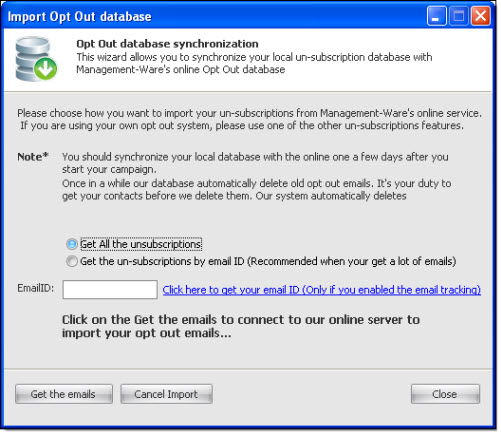
On the “Subscriptions” menu, go to “Synchronization with online service opt-out service”. The “Import opt- Out database” dialog box will appear.
You can download all the unsubscribed email addresses or only those of a specific marketing campaign. In order to accomplish this task, you must enter some information in the program options.
If you choose to download the unsubscribed email addresses using the email ID, you must know the ID of your campaign. To see the ID (Email ID) of a campaign you must login to your online account (https://www.mwsnetwork.com).
Please follow the instructions of the following link in order to find out how to generate the Email ID: https://www.mwsnetwork.com/help/en/index.html?overview.htm
After making your choice of download, just click on “Get the Emails” to import the email addresses that are going to be unsubscribed from your list. Once downloaded, you can deactivate them, delete them or put them in a blacklist.
You can stop importing emails anytime. To cancel the import, just click on the “Cancel Import” button. If you click on “Cancel”, your data will not be imported.