Send server - Message queue |
  
|
Send server - Message queue |
|
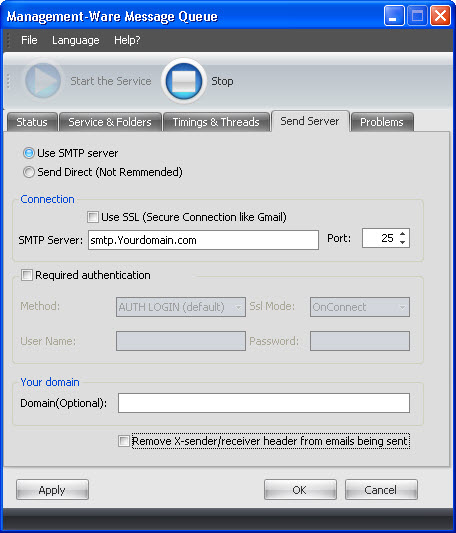
SMTP Server specifies the host name of your SMTP server (like "mail.yourdomain.com").
Port by default: 25. Change this value if your SMTP server operates in other port.
Authentication settings allow using ESMTP and domain authentication with Message Queue.
Method dropdown box specifies ESMTP authentication method to be used. If you do not know the identification method, leave the default option. Otherwise, select the one that your SMTP server supports. CRAM-MD5, NTLM and MSN methods provide secure authentication.
In the "User Name" and “Password" fields enter your email address and the password.
Domain is used as a parameter of HELO/EHLO commands. If it is not specified, the domain name of the machine running Message Queue is used. Most SMTP servers ignore Domain setting. However, some servers (usually those which do not support ESMTP authentication) require it.
Remove x-sender/receiver header from emails being sent setting, if on, forces Management-Ware to remove x-sender/x-receiver header block from outgoing emails. Enable this setting if you do not want to have all the actual recipients of the email listed in x-receiver headers (for instance, if you use BCC recipients and want to ensure their email addresses will not appear in the outgoing e-mails).
To save your data, click on the “Apply” or the “OK” button.
To cancel, you just need to click on the “Cancel” button. If you click on the “Cancel” button, your data will not be saved.