Timing and threads message queue |
  
|
Timing and threads message queue |
|
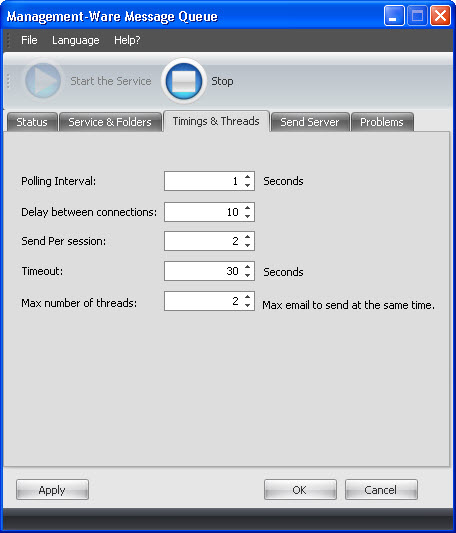
Polling Interval specifies the number of seconds between two successive polls of Queue Directory. On each poll, if new messages are found in the Queue Directory, Message Queue connects to the SMTP server, sends all the messages, and disconnects from the server. Thus, you can increase Polling Interval value if your SMTP server limits the number of connections per minute.
Delay between connections limits the maximum number of emails to be submitted to the SMTP server within one second. Many SMTP servers do limit this value due to spam or security issues. If you are not limited by your server, you can set this value to zero (which means "send at maximum possible speed").
Send Per Session limits the maximum number of emails to be submitted to the SMTP server with one SMTP session (i.e. within one polling interval). Many SMTP servers allow sending only a few messages per session. If your server does not imply such limitation, set this value to zero (which means "send all available messages" ).
Timeout sets the maximum time interval to wait for a connection between your computer and the SMTP server (in seconds).
Max Number of Threads specifies the number of messages which can be simultaneously sent to the mail sever. If you SMTP server does not have any limitations regarding the number of messages submitted by each client in a second, using multiple threads may cause noticeable speed up of sending messages to this SMTP server. If SMTP server restricts the maximum number of sends per seconds to a relatively small value (< 30), using of multithread sending is not recommended.
To save your data, click on the “Apply” or the “OK” button.
To cancel, you just need to click on the “Cancel” button. If you click on the “Cancel” button, your data will not be saved.